DRIFT X

Polyrhythmic Instrument · Standalone · AU · VST3

Polyrhythmic drum instrument by 0010x0010. Voltage becomes rhythm.

App Interface

Voltage Becomes Rhythm

One window, top to bottom: transport and rhythm presets, TRANSIT for the whole mix, recorded PARAMETER MOTION, then the voltage sequencers. Sequencer A plays KICK and OSCILLATOR I from one row of sixteen faders. B does the same for SNARE and OSCILLATOR II, and C for SYNTH / SAMPLE and SLICER. The HYBRID POLY PAD takes its clock from a voice and turns it into chords.
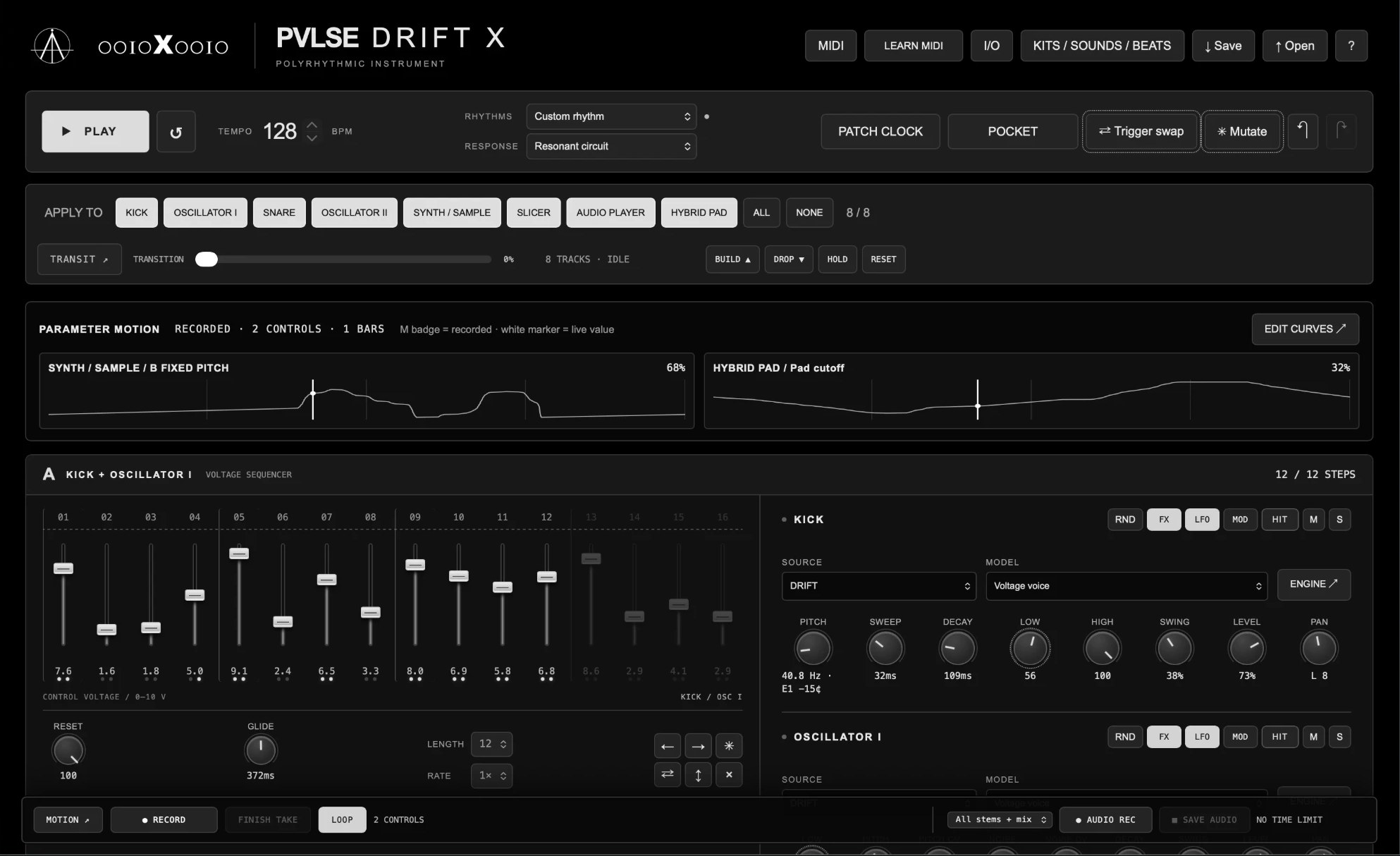
PVLSE DRIFT X main window: transport, TRANSIT, PARAMETER MOTION and voltage sequencer A with the KICK and OSCILLATOR I voices
Build 0.9.16

Recorded in the App

Short loops captured straight from the screen in the current build: the voltage sequencer running under a TRANSIT move, the LFO SHAPER following a kick, and the HYBRID POLY PAD stepping through its chords.

Voltage sequencer · TransitScreen recording
LFO Shaper · KickScreen recording
Hybrid Poly Pad · chord stepsScreen recording
Try It

Two Sequencers, Two Lengths

Sequencers A and B from the app, redrawn here so you can play with the idea. Drag a fader, change a LENGTH, or move a LOW threshold and watch which steps fire.

PVLSEDRIFT X
POLYRHYTHMIC INSTRUMENT
MIDILEARN MIDII/OKITS / SOUNDS / BEATS↓ Save↑ Open?
Tempo128BPM
RhythmsCustom rhythmResponseResonant circuit
PATCH CLOCKPOCKET⇄ Trigger swap
MOTION ↗● RECORDLOOP2 controls
All stems + mix● AUDIO RECNo time limit

Interactive sketch after the real interface · drag the faders and thresholds · no sound

⎓
Control Voltage, 0–10 V
Every step is a fader, not a switch. A sequencer holds up to sixteen voltages, and the pattern is a shape you push around while it plays.
≡
Low & High
Each voice fires when the voltage falls inside its own LOW / HIGH window. Two voices read the same voltages and play different rhythms from them.
◴
Polyrhythm
Each sequencer has its own LENGTH and RATE. Set A to 12 steps and B to 13 and the two patterns drift against each other.
⇄
Voltage Path
SEQUENCE → SCALE / BIAS → CROSS CV / FEEDBACK → GLIDE → VOICE. Bend the voltage before it reaches the sound, add CV DRIFT, or press HOLD CV to stop it where it is.
Sound & Motion

Inside Every Sound

Open any of the eight sounds and you get the same six pages: ENGINE, FX RACK, LFO SHAPER, ENVELOPE / MOD, MOTION and TRANSIT. Below: the pages captured from the current build.

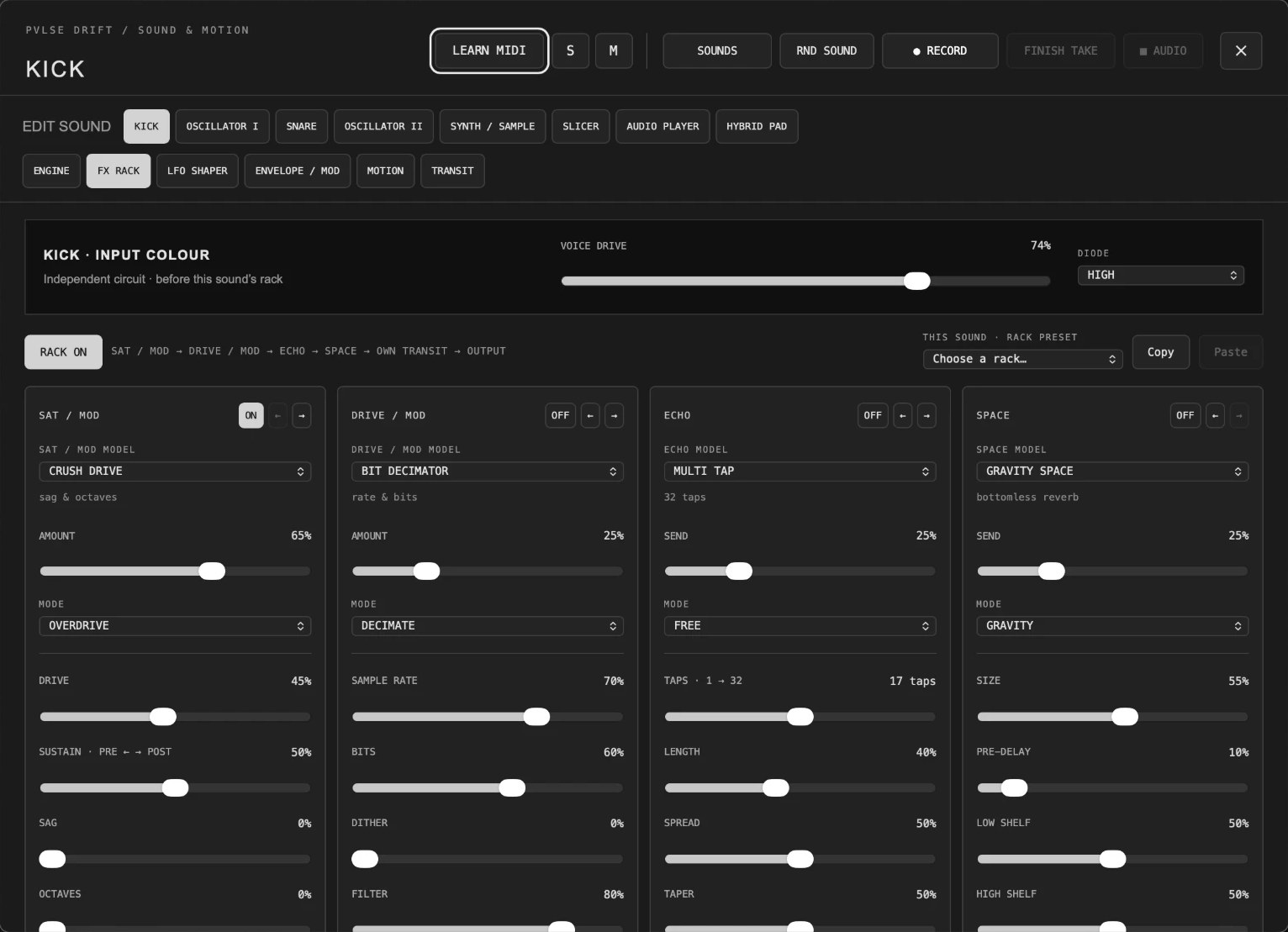
The FX RACK for the KICK: input colour, then SAT / MOD, DRIVE / MOD, ECHO and SPACE slots
FX RackScreenshot
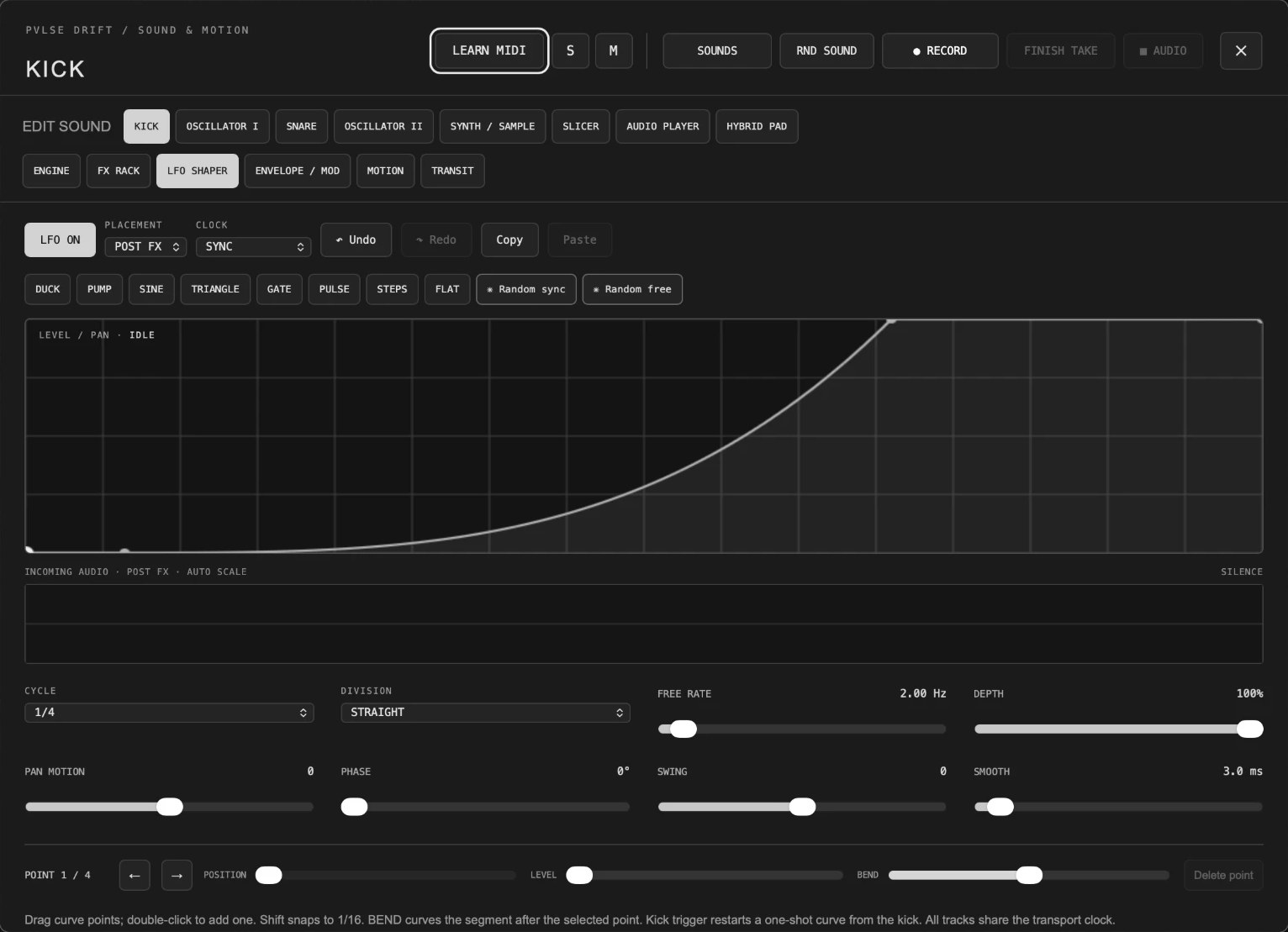
The LFO SHAPER with a drawn curve, shape presets, cycle, division, depth and smoothing
LFO ShaperScreenshot
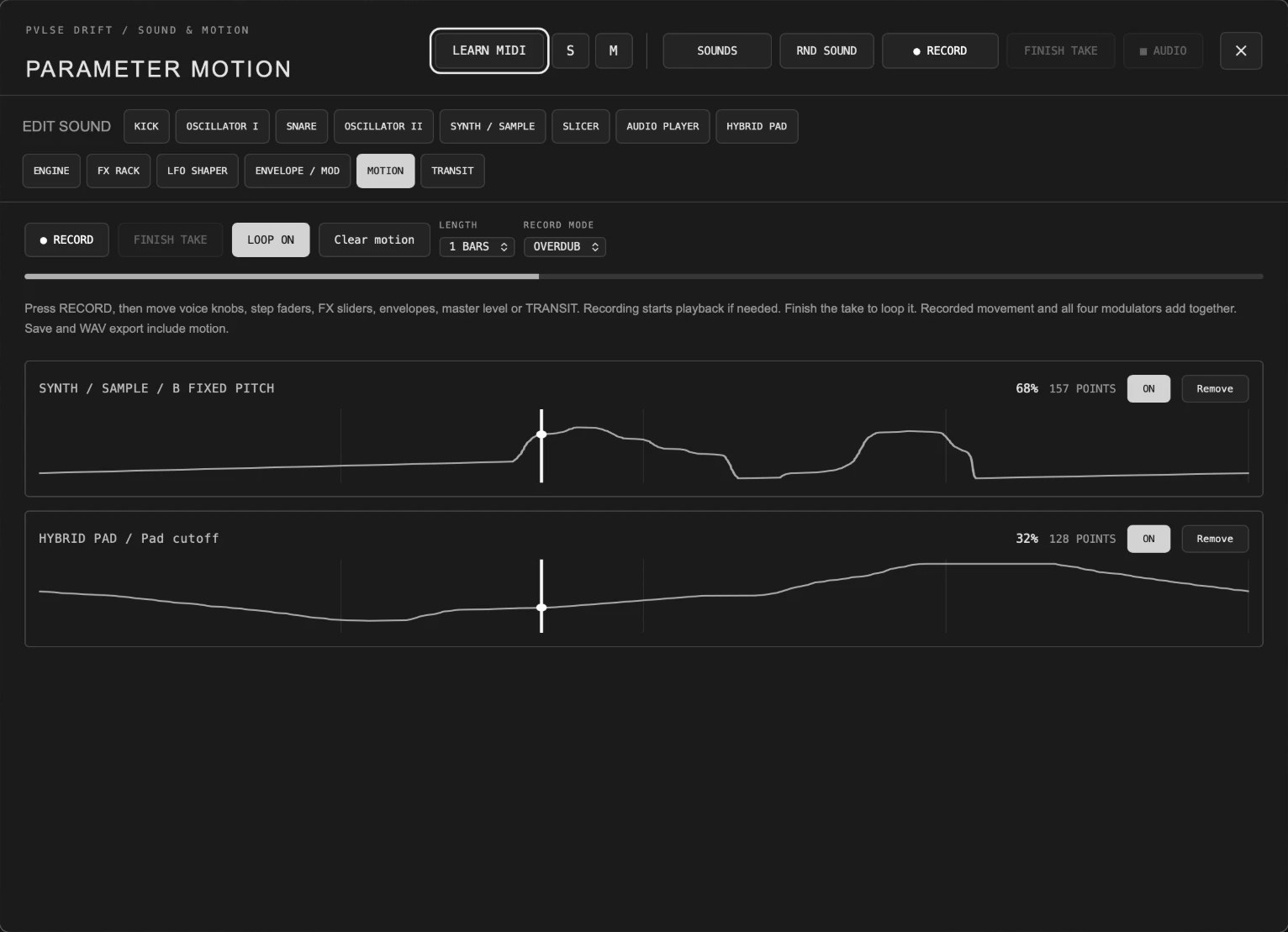
PARAMETER MOTION with two recorded control curves
Parameter MotionScreenshot
▤
FX Rack
An input colour stage with VOICE DRIVE, then four slots in a chain: SAT / MOD → DRIVE / MOD → ECHO → SPACE. Pick a model for each slot, such as CRUSH DRIVE, BIT DECIMATOR, MULTI TAP with up to 32 taps, or GRAVITY SPACE. Save and copy rack presets between sounds.
∿
LFO Shaper
Start from DUCK, PUMP, SINE, TRIANGLE, GATE, PULSE, STEPS or FLAT, or roll a random shape. Drag the curve points, bend each segment, and sync the cycle to the clock or run it free.
✎
Parameter Motion
Press RECORD and move voice knobs, step faders, FX sliders, envelopes, master level or TRANSIT. Finish the take and it loops. Overdub more controls on top. Save and WAV export include the motion.
Envelope / Mod

Shape the Hit, Then Move It

The ENVELOPE / MOD page is where a voice gets its character. Three envelope stages shape each hit, from the first spike to the returning echoes of the strike, and four modulators keep it moving.

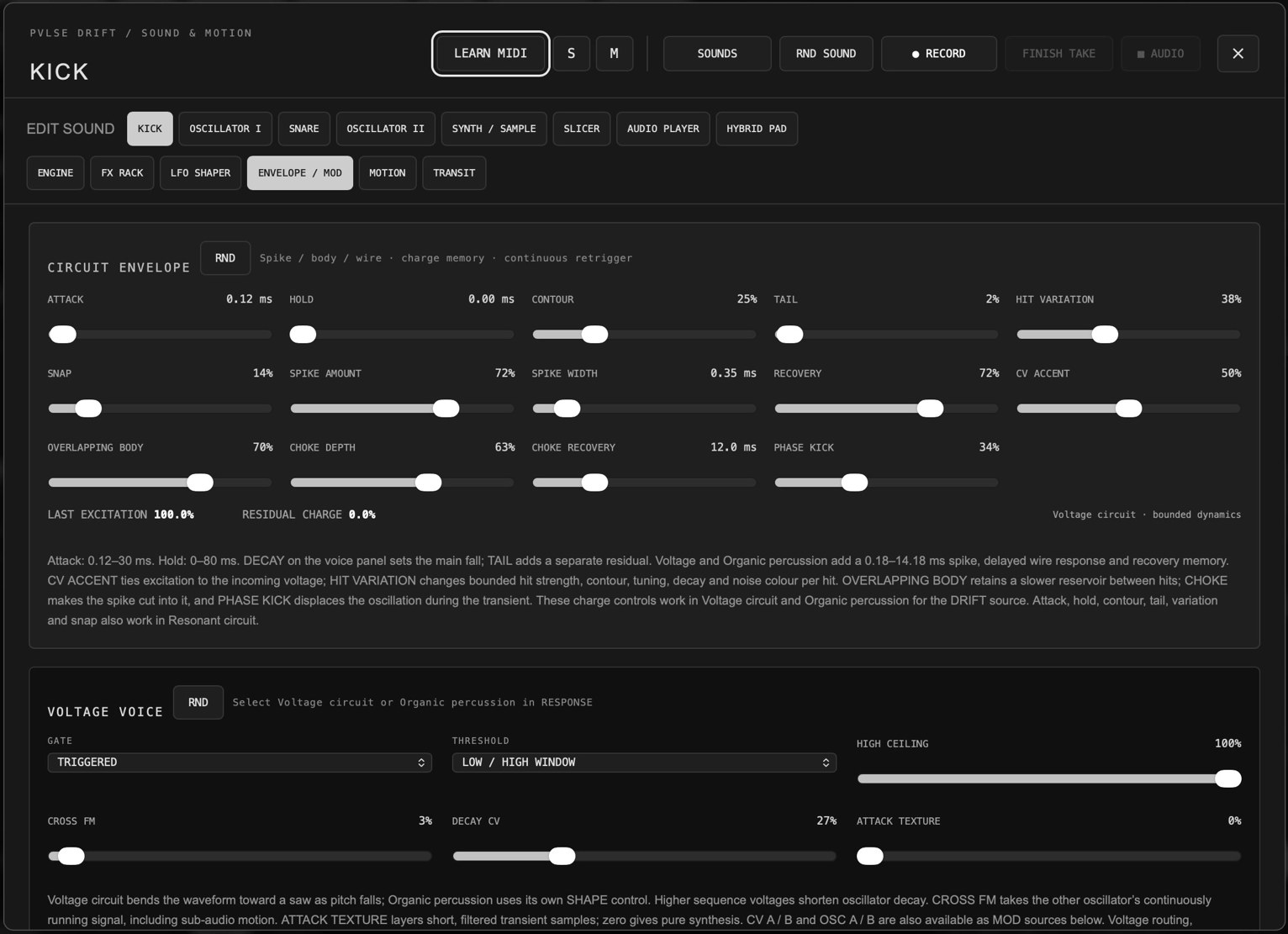
ENVELOPE / MOD page for the KICK: CIRCUIT ENVELOPE and VOLTAGE VOICE controls
Circuit Envelope · Voltage VoiceScreenshot
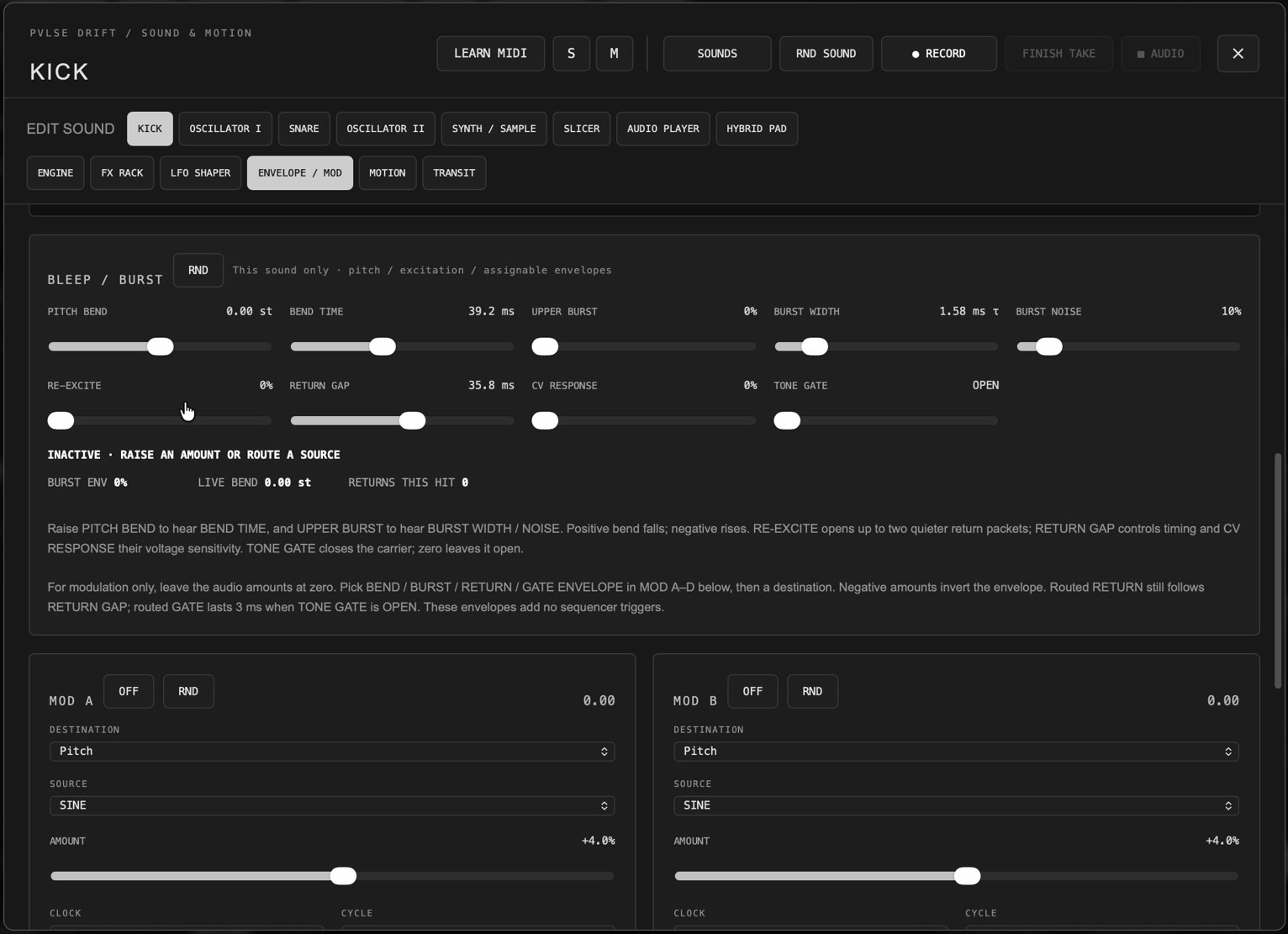
ENVELOPE / MOD page for the KICK: BLEEP / BURST controls and the MOD A and MOD B slots
Bleep / Burst · Mod A–DScreenshot
⌁
Circuit Envelope
Spike, body and wire, with charge memory and continuous retrigger. ATTACK runs from 0.12 to 30 ms and HOLD from 0 to 80 ms. DECAY on the voice panel sets the main fall, and TAIL adds a separate residual. SPIKE AMOUNT, SPIKE WIDTH and RECOVERY shape the first transient. CONTOUR and SNAP set its curve.
≈
Charge & Variation
CV ACCENT ties the strength of each hit to the incoming voltage. HIT VARIATION changes strength, contour, tuning, decay and noise colour per hit, within bounds. OVERLAPPING BODY keeps a slower reservoir between hits, CHOKE makes the spike cut into it, and PHASE KICK displaces the oscillation during the transient.
⎓
Voltage Voice
Choose how the voice is gated and how it reads the voltage: a LOW / HIGH window with a HIGH CEILING. Higher sequence voltages shorten the decay with DECAY CV. CROSS FM takes the other oscillator's continuously running signal. ATTACK TEXTURE layers short, filtered transient samples, and zero gives pure synthesis.
↯
Bleep / Burst
PITCH BEND and BEND TIME add a pitch drop or rise to the hit. UPPER BURST, BURST WIDTH and BURST NOISE add a burst on top. RE-EXCITE opens up to two quieter return packets, with RETURN GAP for their timing and CV RESPONSE for their voltage sensitivity. TONE GATE closes the carrier.
∿
Mod A–D
Four modulators per sound. Each has a DESTINATION, a SOURCE and an AMOUNT, a clock that syncs to a CYCLE or runs at a FREE RATE, plus PHASE, RESTART and POLARITY. Negative amounts invert the source. RND rolls a new modulation for one slot.
⇄
Envelopes as Sources
The BEND, BURST, RETURN and GATE envelopes can be picked as sources in MOD A–D and sent to any destination, without adding them to the audio. CV A / B and OSC A / B are available as sources too. Recorded motion and all four modulators add together.
Eight Tracks

One Sound, One Editor

Three sequencers of sixteen control steps play six voices in pairs. An audio player and a pad complete the eight tracks. Every sound opens in the same editor, so what you learn on one track works on the next. The six voices answer on these MIDI notes by default.

KICK
Seq A · MIDI note 36
OSCILLATOR I
Seq A · MIDI note 42
SNARE
Seq B · MIDI note 38
OSCILLATOR II
Seq B · MIDI note 46
SYNTH / SAMPLE
Seq C · MIDI note 60
SLICER
Seq C · MIDI note 62
AUDIO PLAYER
Continuous audio
HYBRID POLY PAD
D · 8 voices
Sources

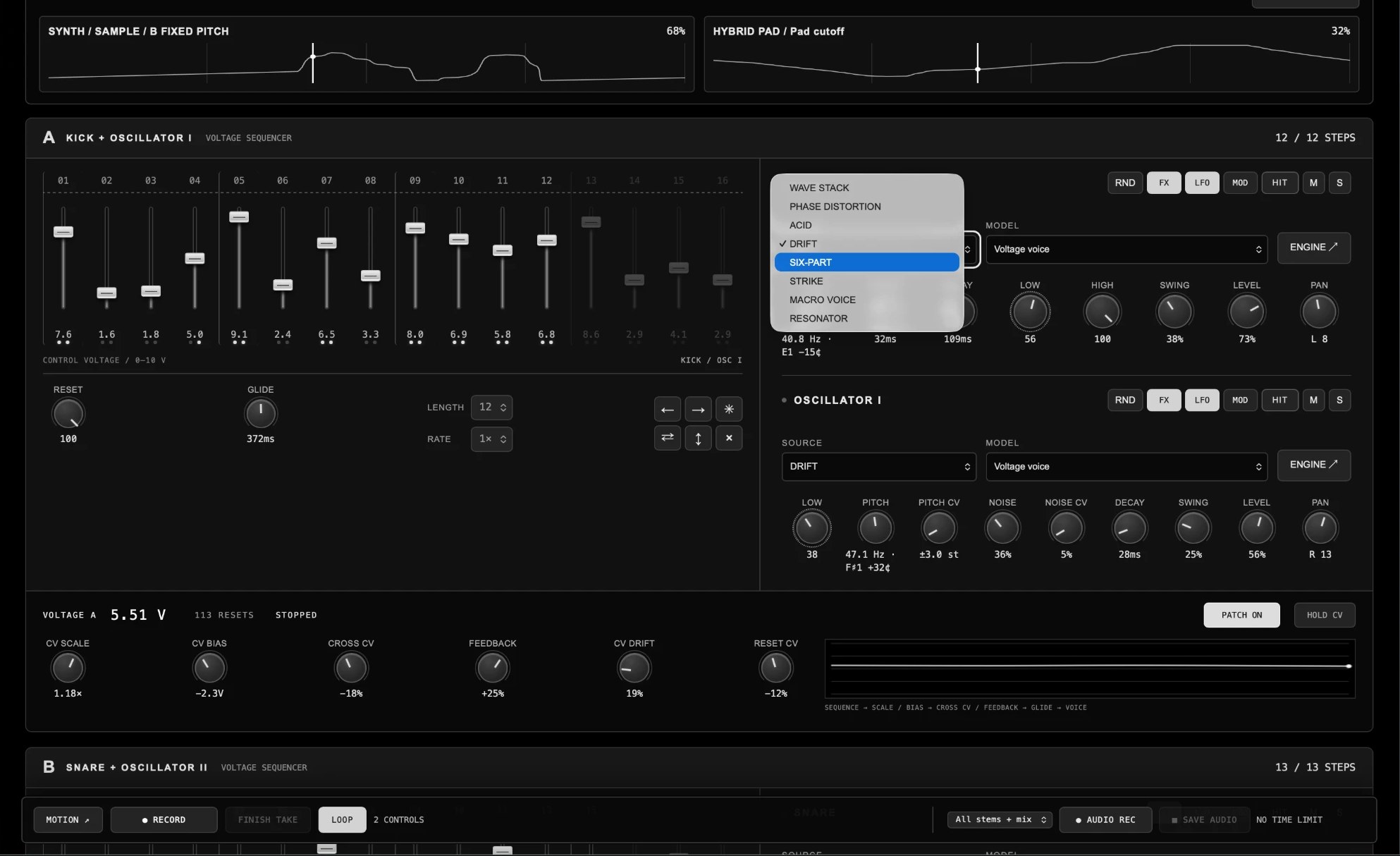
Choose a source and a model for each voice, then open ENGINE for the full sound.

DRIFT
Voltage voice
WAVE STACK
Source
PHASE DISTORTION
Source
ACID
Source
SIX-PART
Source
STRIKE
Source
MACRO VOICE
Source
RESONATOR
Source
Capabilities

Built to Be Played

Everything is aimed at fast, hands-on rhythm ideas you can record and take with you.
♩
Rhythms & Response
Start from a rhythm preset or build a custom one, and choose how the voices respond to voltage. PATCH CLOCK and POCKET shape the timing and groove.
⚄
Trigger Swap & Mutate
Trigger swap exchanges which voices the triggers play. Mutate nudges what you already have. RND rolls a new sound for one voice. Undo and redo are always one click away.
↗
Transit
Perform a transition across the tracks you choose with APPLY TO. One TRANSITION slider, with BUILD, DROP, HOLD and RESET.
⎓
Shape the Voltage
CV SCALE, CV BIAS, CROSS CV, FEEDBACK, CV DRIFT and RESET CV work on each sequencer's voltage, with RESET and GLIDE per sequence.
♫
Voice Controls
PITCH, SWEEP, DECAY, SWING, LEVEL and PAN on the voice, with FX, LFO, MOD, HIT, mute and solo one click away.
✂
Your Own Audio
Load files or a whole folder, and DRIFT X remembers your folders. Recompose a loop in the SLICER, or play a continuous file in the AUDIO PLAYER alongside the pattern.
♪
Hybrid Poly Pad
The pad takes its clock from a voice, divides it, and plays chords such as ROOT + FIFTH in the scale you choose. CHORD GUARD moves the chord on after a set number of repeats.
▧
Kits, Sounds, Beats
Save the right kind of idea: a single sound, a kit, a beat, or the whole project with Save and Open.
⎈
MIDI & I/O
LEARN MIDI puts controls on your hardware, the voices answer on a default note map, and I/O routes audio to your interface.
⧉
Standalone, AU, VST3
Run DRIFT X on its own as a standalone app, or load it inside your DAW as an AU or VST3 plug-in.
●
Audio Rec
Record all stems plus the mix, or the stereo mix alone, while you play, with no time limit. Export WAV renders a set number of bars with a tail.
8
Independent tracks
3 × 16
Control steps · 0–10 V
29
FX algorithms
AU · VST3
Plus standalone
∞
Audio rec · no time limit
Questions

FAQ

What is DRIFT X?
PVLSE DRIFT X is a polyrhythmic drum instrument that makes rhythm from step voltages and thresholds, an idea borrowed from modular synthesis. It has eight independent tracks: six voices played by three voltage sequencers, an audio player and a pad.
Which formats does it come in?
DRIFT X runs on macOS as a standalone app and as an AU and VST3 plug-in, so you can play it on its own or inside your DAW.
Why “polyrhythmic”?
Each voltage sequencer has its own length and rate. Run one at 12 steps and another at 13 and they only line up again after many bars, so the groove keeps moving.
How is it different from PVLSE?
PVLSE is the full groovebox, with drum lanes, synth parts, clips and stem recording. DRIFT X focuses on drums and one idea: voltages crossing thresholds.
Can I use my own audio?
Yes. Slice loops into new rhythms in the SLICER, play continuous files in the AUDIO PLAYER, and use samples in the SYNTH / SAMPLE voice.
Does it work with MIDI controllers?
Yes. Use LEARN MIDI to map controls. The six voices respond on default MIDI notes: kick 36, snare 38, oscillator I 42, oscillator II 46, synth/sample 60 and slicer 62.
How do I get my music out?
AUDIO REC records all stems plus the mix with no time limit. Export WAV renders a chosen number of bars. Recorded parameter motion is included.
Is it finished?
The current build is 0.9.16, which is pre-1.0. Click “Request Access” and choose the apps option in the contact form to ask about access.
Same Studio

More Instruments

PVLSE
The full groovebox. Compose through performance.
ILLVMIN8R
Visual performance instrument. Make any visual audio reactive.
LIQVID
Photo and video studio. Morph, looks, generators, render.
Featured & Partnered With
SamsungVarietyVogueForbesDesignboomCulturedMixmagBBC Radio 1