PVLSE

Groovebox · Standalone · AU · VST3

Groovebox by 0010x0010. Compose through performance.

App Interface

The Instrument

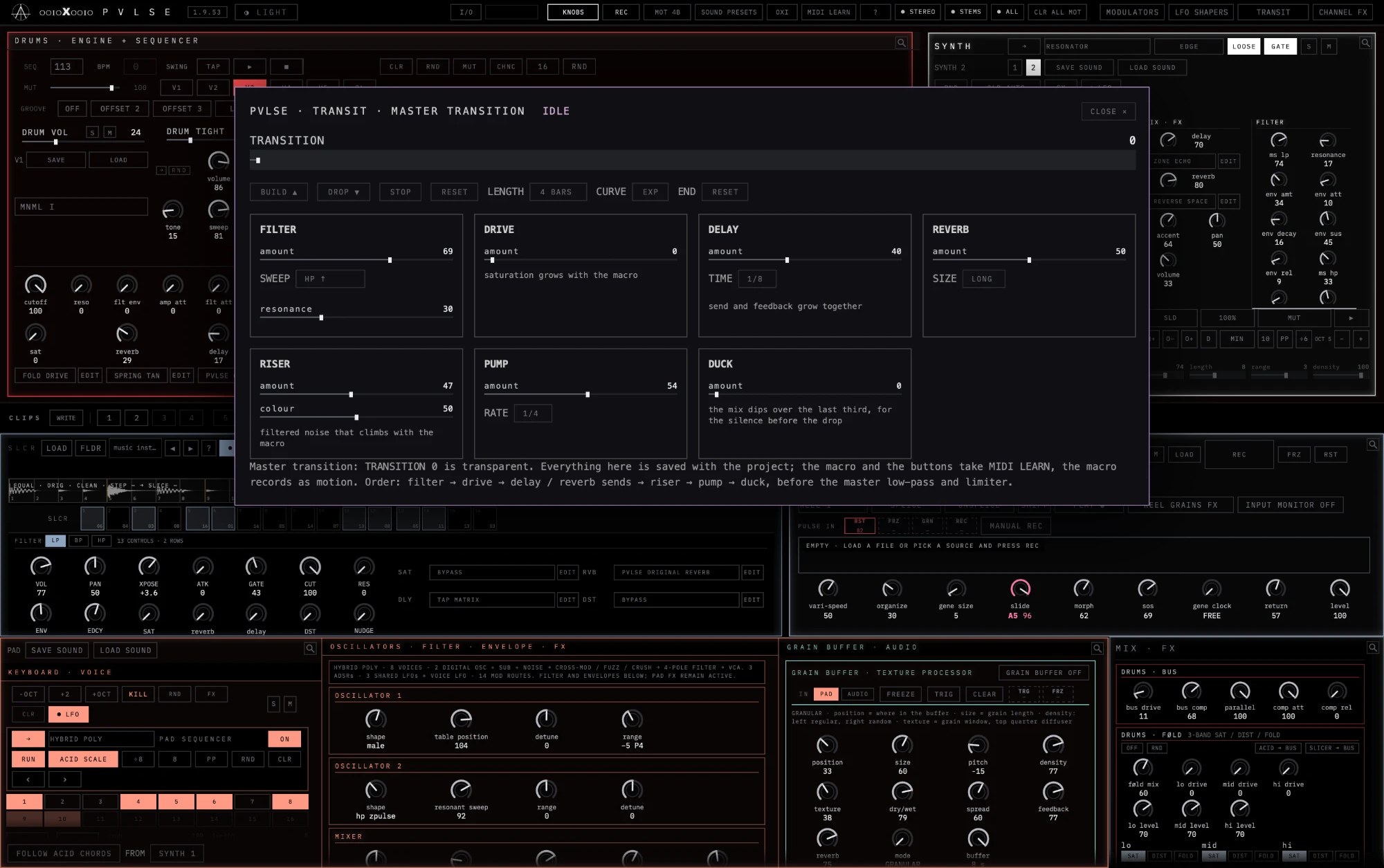
Everything sits on one screen: DRUMS with engine and sequencer, SYNTH, CLIPS, the SLICER, REEL GRAINS, the PAD, the GRAIN BUFFER and MIX · FX. The top bar opens the MODULATORS, LFO SHAPERS, TRANSIT and CHANNEL FX, and any panel can be zoomed into focus.
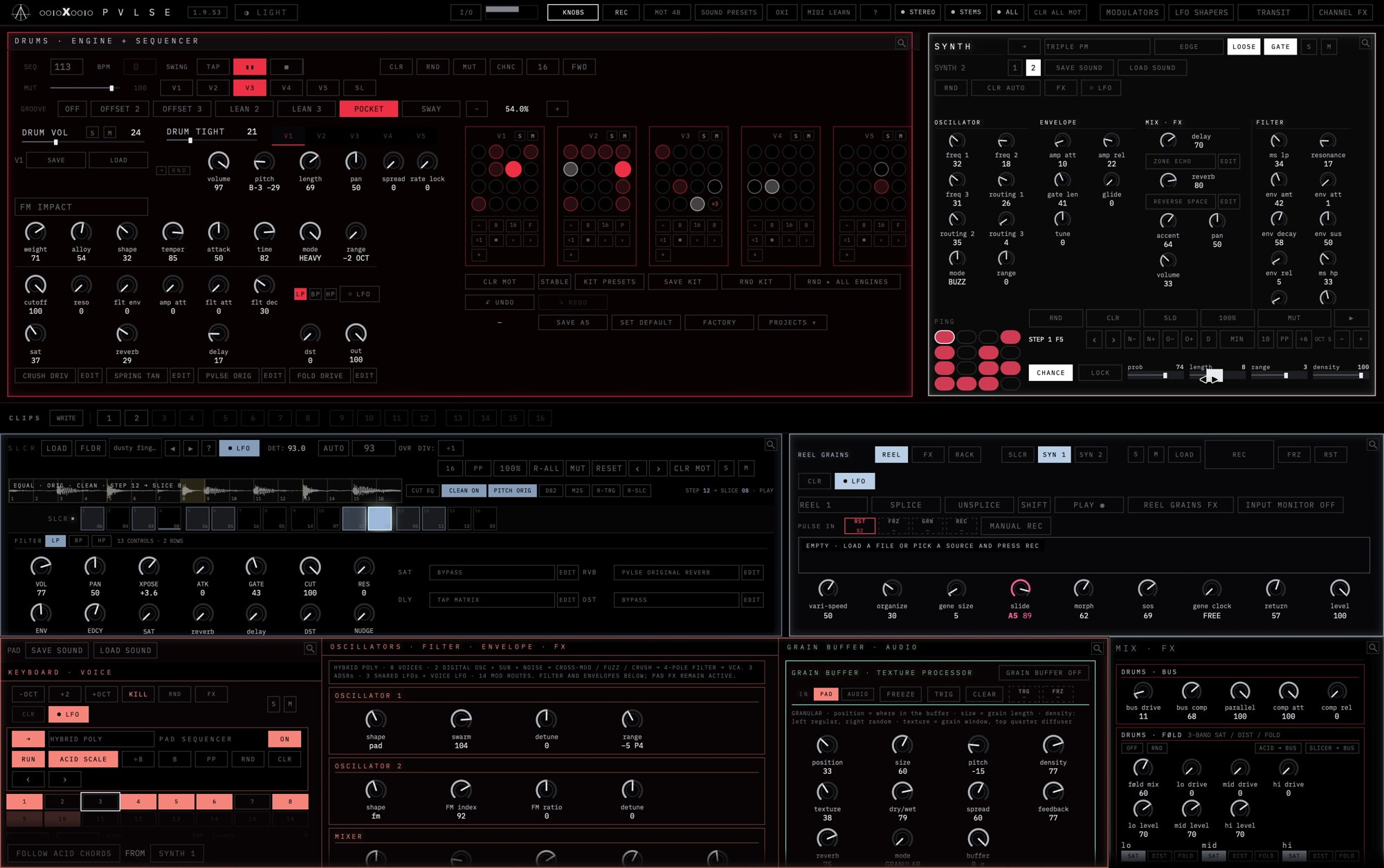
PVLSE main window: drums, synth, clips, slicer, reel grains, pad, grain buffer and mix FX on one screen
Main windowBuild 1.9.53
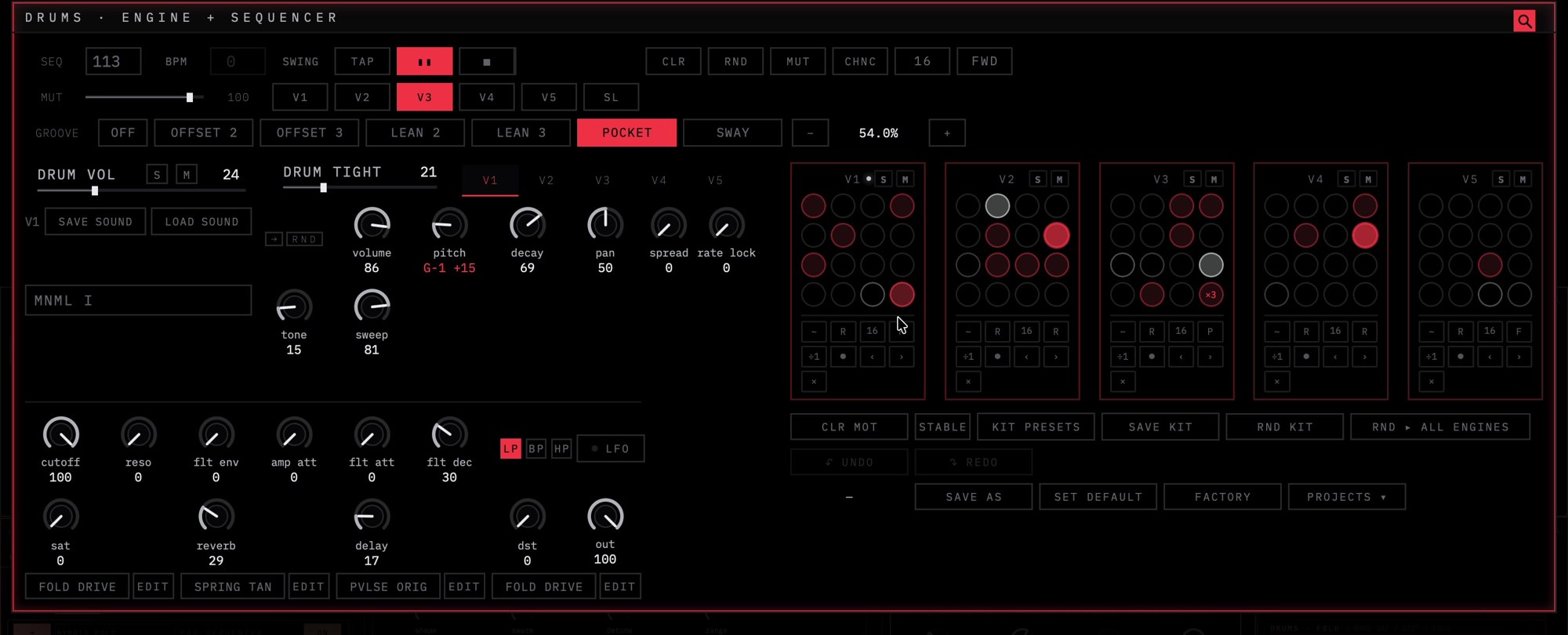
DRUMS panel in focus: groove selector, voice controls for V1 with the MNML I engine, and five 16-step voice grids
Drums · Engine + SequencerScreenshot
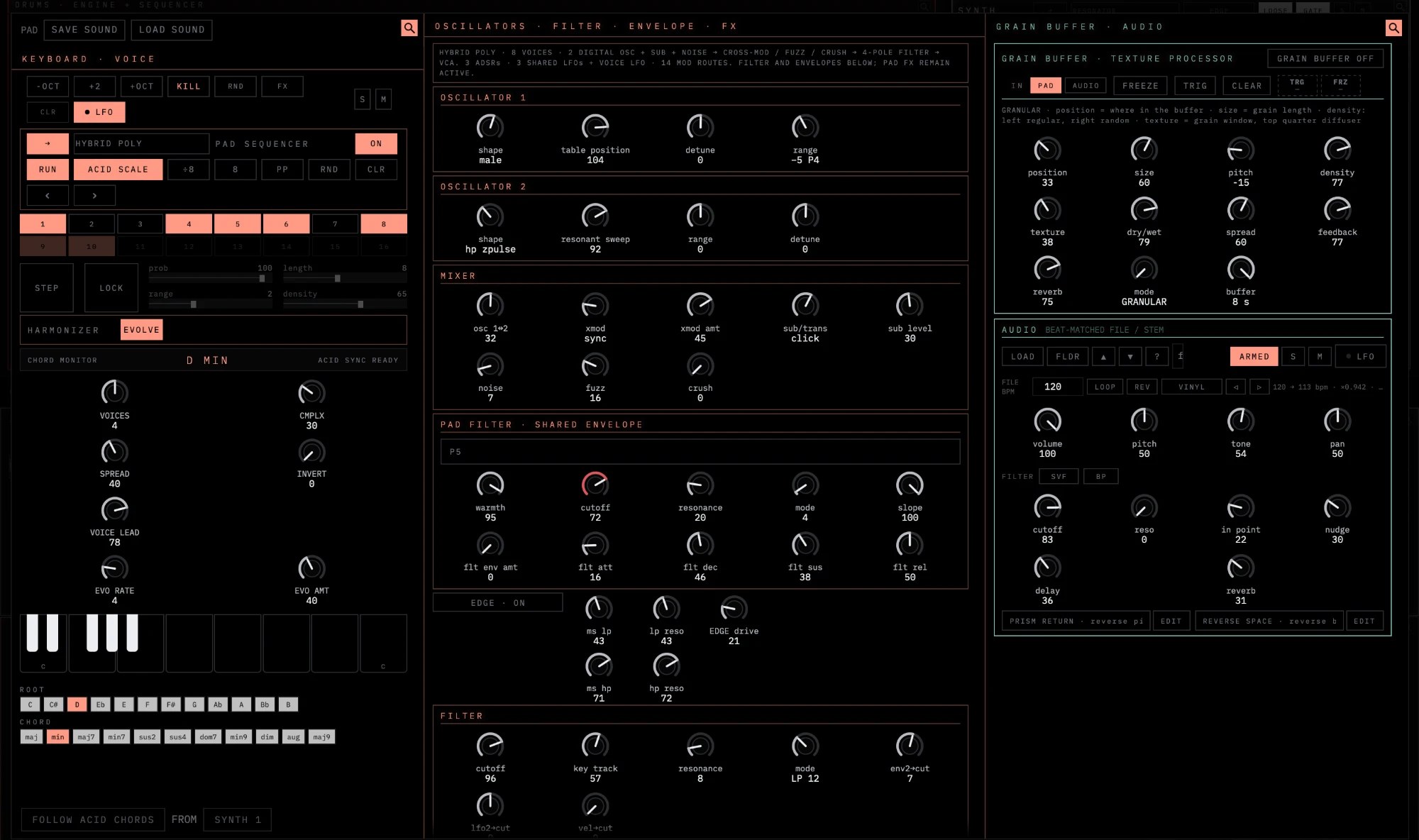
The PAD in focus: keyboard and voice, pad sequencer, harmonizer, oscillators, mixer, pad filter and envelopes, with the GRAIN BUFFER and AUDIO player beside it
Pad · Grain Buffer · AudioScreenshot
Build 1.9.53

Recorded in the App

Short loops captured straight from the screen in the current build: the drum sequencer running, an LFO SHAPER curve against the incoming audio, the whole instrument playing, and the slicer stepping through a loop.

Drums · five voices runningScreen recording
LFO Shapers · Synth 1Screen recording
Main windowScreen recording
SlicerScreen recording
Try It

Five Voices, Sixteen Steps

The drum sequencer and the pad sequencer, redrawn here so you can play with them. Click a pad to switch a step on, click again for an accent, and press R to roll a new pattern for one voice.

Drums · Engine + Sequencer113 BPM · 16 steps
GrooveOffOffset 2Lean 2PocketSway54.0%
Pad · Keyboard · VoiceHybrid Poly · Pad Sequencer
16 steps
Chord MonitorD MIN
Root
Chord

Interactive sketches after the real drum and pad panels · no sound

▦
Drums · Engine + Sequencer
Five voices, V1 to V5, each with its own engine, a sixteen-step grid of pads, solo, mute and its own length and direction. Clear, randomise, mute and chance sit next to the transport.
♩
Groove
Pick a groove from OFFSET, LEAN, POCKET and SWAY, set the amount, and tighten the kit with DRUM TIGHT.
∿
Two Synths
SYNTH 1 and SYNTH 2 each have an engine, envelope, filter and their own mix effects. Save and load sounds per synth.
▣
Clips
Write patterns into clip slots and launch them while you play. The track's structure is something you perform, not something you draw.
Pad · Grain · Audio

Harmony and Texture

The pad carries the chords, the grain buffer turns any signal into texture, and the audio player keeps a full file or stem in time with the pattern.

♪
Hybrid Poly
Eight voices. Two digital oscillators plus sub and noise run through cross-mod, fuzz and crush into a 4-pole filter and VCA. Three ADSRs, three shared LFOs plus a voice LFO, and 14 modulation routes.
▤
Pad Sequencer & Harmonizer
Sixteen steps with probability, length, range and density. Choose a root and one of eleven chord types, let the harmonizer EVOLVE the voicing, or have the pad follow the chords of a synth.
∷
Grain Buffer
A texture processor fed by the pad or the audio input. Position, size, pitch, density, texture and spread shape the grains, with FREEZE and TRIG to capture a moment of the buffer.
▶
Audio Player
Load a file or stem and PVLSE beat-matches it to the project tempo. Loop it, reverse it, add VINYL, filter it, and nudge it into place.
✂
Slicer
Load a loop or a folder, slice it in equal parts or by step, and play the slices as a new rhythm with their own filter, saturation, delay and reverb.
●
Reel Grains
Record a source into the reel and play it back as grains, with its own effects. Overdub while it runs, or monitor the input live.
Modulators · LFO Shapers

Patch the Movement

The MODULATORS panel holds SEGMENT MOD A + B, RANDOM MOD and the DUAL FUNCTION generator. Right-click a slider to map a modulator to it. LFO SHAPERS give every channel a curve you draw yourself.

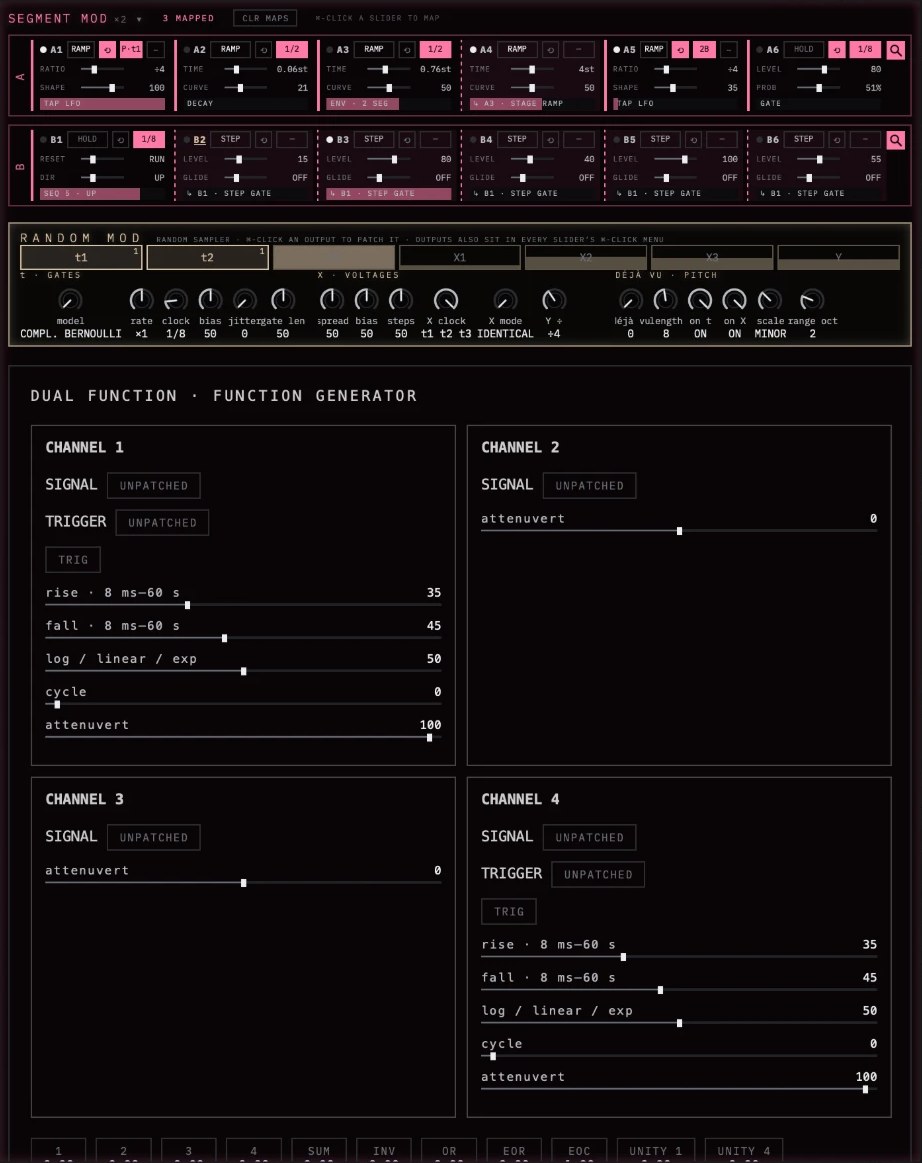
MODULATORS panel: SEGMENT MOD A and B with six segments each, RANDOM MOD, and the four-channel DUAL FUNCTION generator
Segment Mod · Random Mod · Dual FunctionScreenshot
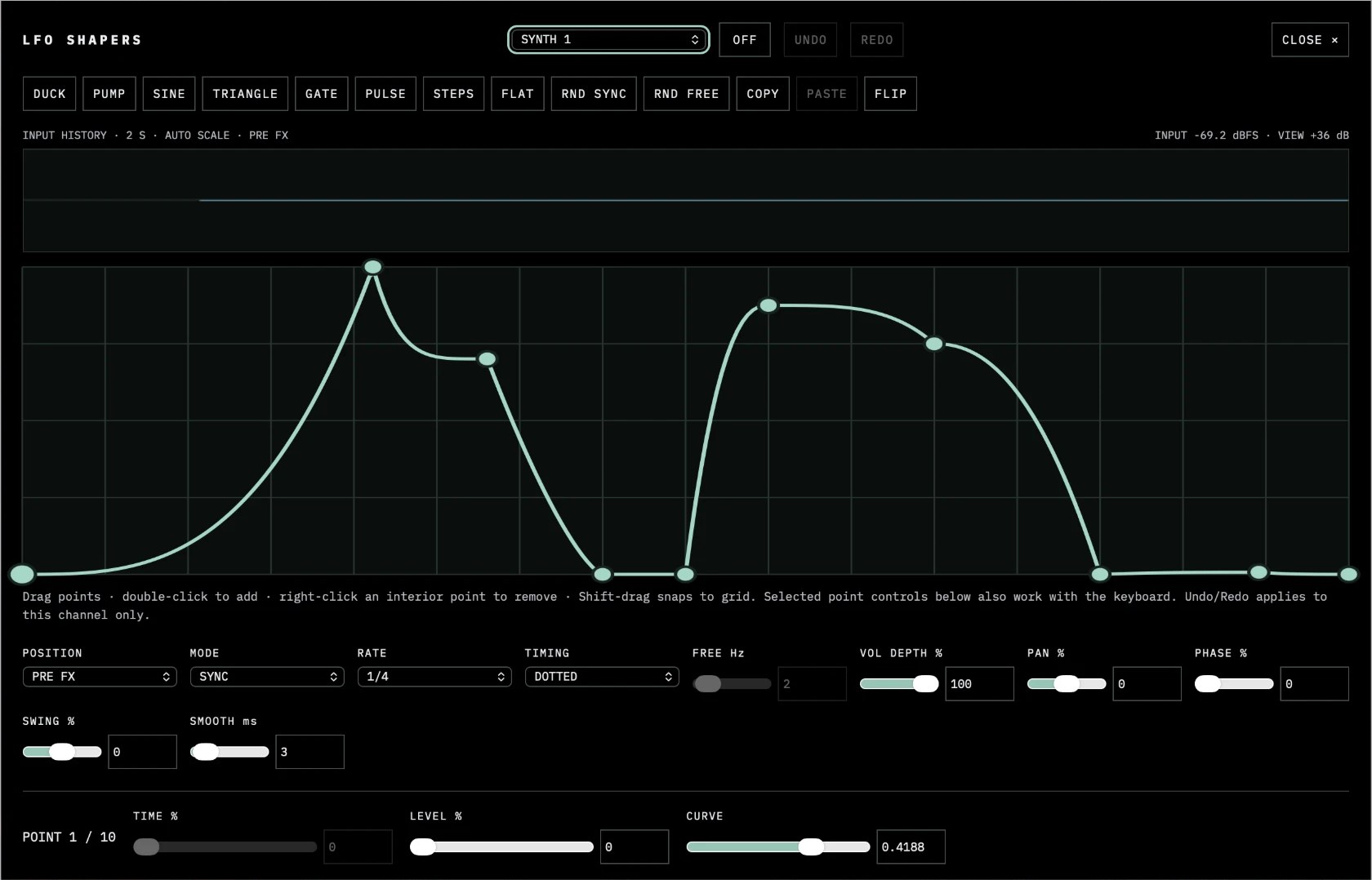
LFO SHAPERS for SYNTH 1 with a hand-drawn ten-point curve
LFO ShapersScreenshot
⌁
Segment Mod A + B
Two rows of six segments. Each segment is a RAMP, a HOLD or a STEP with its own time, level and curve, and segments can be joined, looped and gated to build envelopes, LFOs and step sequences.
⚄
Random Mod
A random sampler with gate outputs and voltage outputs. Set the rate, clock, bias, jitter and spread, quantise the voltages to a scale, and patch any output to a slider.
∧
Dual Function
A four-channel function generator. Rise and fall run from 8 ms to 60 s with a log, linear or exponential shape, a cycle mode and an attenuverter. Mixed outputs include SUM, INV and OR, plus end-of-rise and end-of-cycle gates.
∿
LFO Shapers
Start from DUCK, PUMP, SINE, TRIANGLE, GATE, PULSE, STEPS or FLAT, or roll a random shape. Drag points, double-click to add one, and set the curve of each segment. Sync to the clock with straight or dotted timing, or run free, with volume depth, pan, phase, swing and smoothing.
Mix · FX · Transit

Finish and Perform the Mix

MIX · FX shapes the drum bus and the character of the delays and reverbs. TRANSIT is one macro for the whole master: push it up for a build, let it fall for a drop.
TRANSIT master transition panel open over the main window: filter, drive, delay, reverb, riser, pump and duck
TransitScreenshot
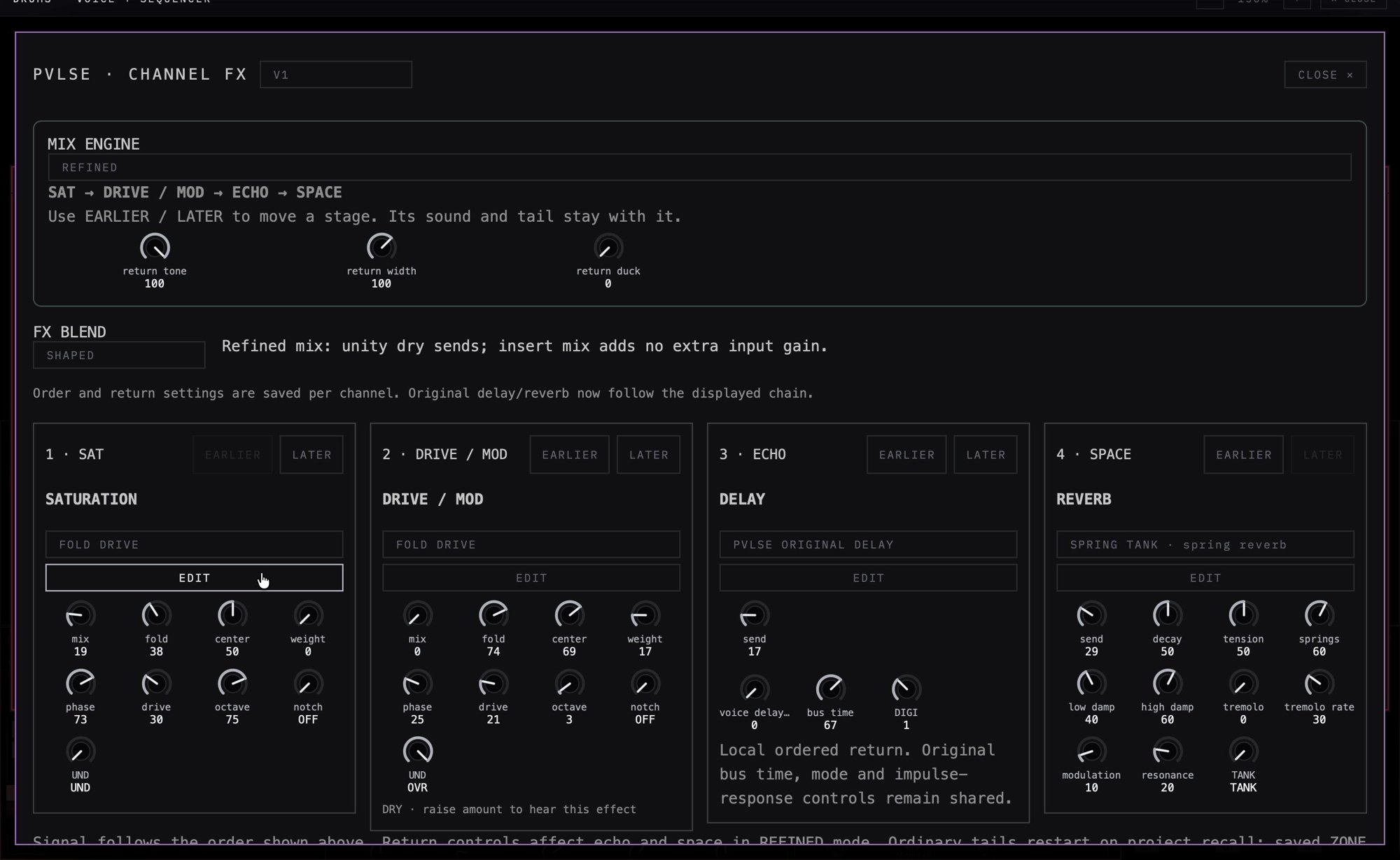
CHANNEL FX for voice V1: mix engine, FX blend and four stages, saturation, drive / mod, delay and reverb
Channel FXScreenshot
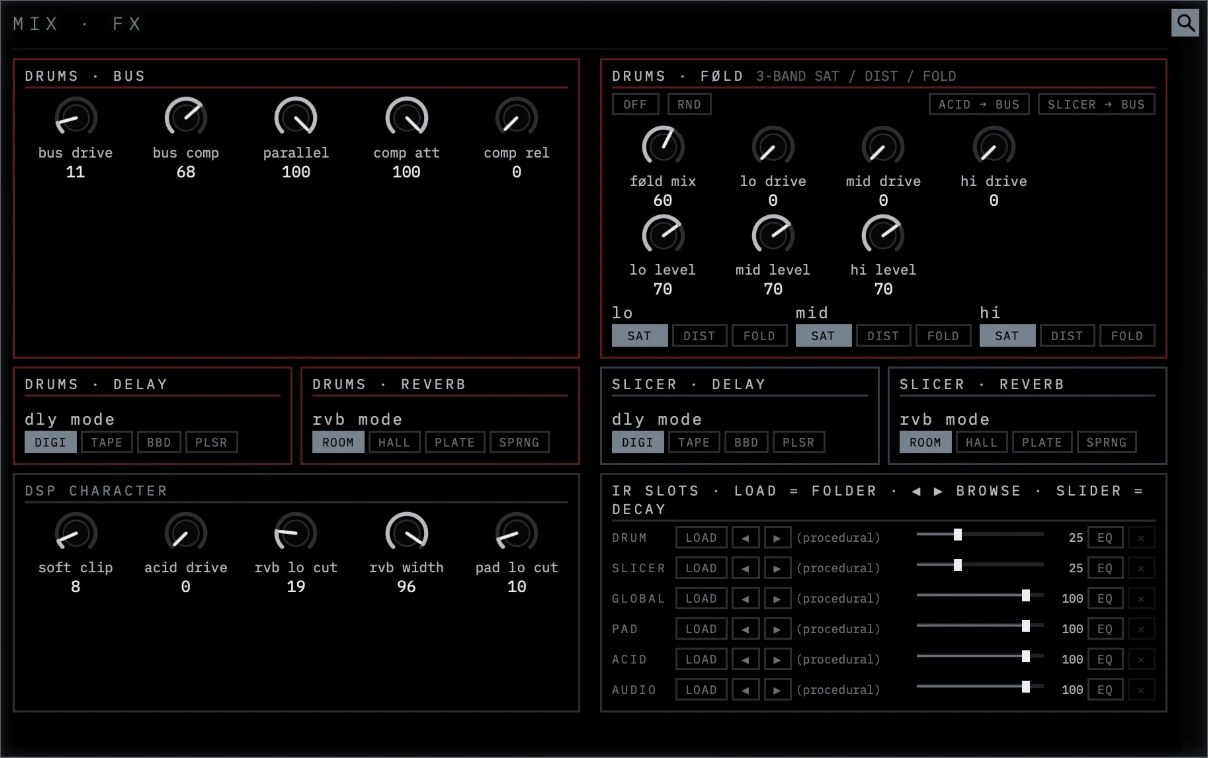
MIX FX panel: drums bus, FOLD three-band saturation, delay and reverb modes, DSP character and impulse response slots
Mix · FXScreenshot
↗
Transit
One TRANSITION macro drives FILTER, DRIVE, DELAY, REVERB, RISER, PUMP and DUCK together. BUILD and DROP run it for you over a set LENGTH and CURVE. At zero it is transparent. The macro takes MIDI learn and records as motion.
☰
Channel FX
Every channel has four stages: SAT → DRIVE / MOD → ECHO → SPACE. Pick a model for each, and use EARLIER / LATER to move a stage in the chain. Its sound and tail stay with it. Order and return settings are saved per channel.
▤
Drum Bus & FØLD
Bus drive and compression with a parallel blend, then FØLD: three bands, each set to saturate, distort or fold, with its own drive and level.
≋
Delay & Reverb Modes
Delays switch between DIGI, TAPE, BBD and PLSR. Reverbs switch between ROOM, HALL, PLATE and SPRNG. Drums and slicer each have their own pair.
⌂
IR Slots
Load your own impulse responses from a folder for the drums, slicer, pad, acid, audio and global reverbs, each with decay and EQ.
Sound

Engines

The character comes mainly from contemporary modular synthesis: evolving textures, interacting modulation and sounds that change as they are played. Samples from classic drum machines and synthesisers are included for when a track calls for a familiar tone.

MNML I
Drum
MNML II
Drum
BIT PATTERNS
Drum
SIX-PART DRUM
Drum
SPECTRAL BASIS
Drum
QUAD PM
Drum
FM IMPACT
Drum
SAW DRIVE
Drum
TRIPLE PM
Drum · Synth
SPECTRAL PAIR
Drum
WAVE STACK
Drum · Synth
HARMONIC TRIAD
Drum
STRIKE
Drum
MACRO VOICE
Drum
RESONATOR
Drum · Synth
SAMPLE
Your samples
ACID
Synth
PHASE WEAVE
Synth · 9 algorithms
HYBRID POLY
Pad · 8 voices
GRAIN BUFFER
Granular
REEL GRAINS
Record · overdub
SLICER
Loops
AUDIO PLAYER
Beat-matched files
Capabilities

Compose Through Performance

“I don’t separate producing from performing. Randomisation gives you something to react to. Then your taste takes over: what you keep, what you change, and when you hit record.”Ray Tijssen · 0010x0010
⚄
Controlled Randomness
Randomisers propose patterns and sounds for one lane, one voice or the whole clip. You decide what stays, shape it, and move on.
◐
Light & Dark
Switch the whole interface between a dark and a light look, and zoom into any panel to work on it in focus.
∿
Modulation
Right-click a slider to map a modulator to it. SEGMENT MOD builds staged envelopes, RANDOM MOD adds chance, DUAL FUNCTION gives rise and fall shapes, and LFO SHAPERS let you draw the curve.
✎
Parameter Motion
Turn a control while recording and the movement becomes part of the pattern. Clear one motion or all of them at any time.
✂
Slicer & Grains
Slice a loop into a new rhythm, freeze a moment in the GRAIN BUFFER, or record straight into REEL GRAINS and overdub while it plays.
▤
Racks & Master Path
An effects rack on each channel, then a group and master path. TRANSIT performs builds and transitions across the whole mix.
●
Mix & Stems
Record the performance as a stereo mix, as separate stems, or both at once. Route channels to hardware outputs and bring hardware back in.
⎈
MIDI & Clock
MIDI learn puts any parameter on a hardware controller. Follow an external clock to play in time with the rest of your setup.
▧
Sounds, Kits, Projects
Save a single sound, a whole kit or the complete project, and build a library you can reuse across sessions.
16
Drum engines
5 × 16
Drum voices · steps
8
Pad voices · 14 mod routes
1.9.53
Current build
Alien Illuminate Label

A Route to an Audience

A tool gets you to a finished piece. It doesn’t get you heard. Each month, members submit finished tracks made with PVLSE. 0010x0010 selects four for release on the Alien Illuminate label, and one more to receive a video he creates and shares on his channels.

4
Releases a month
Four members’ tracks are selected each month for release on the Alien Illuminate label.
1
Video a month
One further track receives a video created by 0010x0010.
300K+
Instagram followers
The video is shared on his channels, which reach over two million monthly views.

Selection is by artistic review, not automatic. Label releases are subject to separate artist agreements.
Questions

FAQ

What is PVLSE?
A groovebox for creating and performing electronic music. Drums, synths, a pad, sampling, modulation, effects and recording live in one instrument. It runs as a standalone app and as an AU and VST3 plug-in.
Which formats is it available in?
Three: a standalone app, an Audio Unit (AU) and a VST3 plug-in, on macOS. The plug-ins are the same instrument inside your DAW, with the same interface and sounds.
Do I need hardware to use it?
No. Everything can be played from the screen. If you have a controller, MIDI learn maps any parameter to it, and PVLSE can follow an external clock.
Can I use my own sounds?
Yes. Load samples into the sample voices, import wavetables into WAVE STACK, slice your own loops, play full audio files, or record into REEL GRAINS.
Can I record a finished track?
Yes. Record the stereo mix and separate stems of your performance, ready for release or for further work elsewhere.
How does it work with ILLVMIN8R?
A track recorded in PVLSE can drive a visual performance in ILLVMIN8R, which gives you a direct route from a piece of music to its video. Run both together and the music drives the image live.
How is DRIFT X different?
PVLSE DRIFT X is a polyrhythmic drum instrument that builds rhythm from step voltages and thresholds, available standalone and as an AU and VST3 plug-in. PVLSE is the full groovebox.
How do I get access?
Click “Request Access” and choose the apps option in the contact form. Pricing and the release date have not been announced yet.
Same Studio

More Instruments

DRIFT X
Polyrhythmic drum instrument. Voltage becomes rhythm.
ILLVMIN8R
Visual performance instrument. Make any visual audio reactive.
LIQVID
Photo and video studio. Morph, looks, generators, render.
Featured & Partnered With
SamsungVarietyVogueForbesDesignboomCulturedMixmagBBC Radio 1